On diagnosing performance problems before spending the budget to solve the wrong one.
There’s a scenario that plays out in warehouses, hospitals, bank branches, and software companies with a regularity that should be unsettling.
A new system goes live. Or a process changes. Or a compliance requirement lands. Leadership commissions training. The team completes it — 90%, 95%, sometimes 100% completion rates. Knowledge checks pass. The LMS looks great.
And then the metrics on the floor don’t move. Or they get worse.
This is not a training failure. It is a diagnosis failure. The organization skipped the step that should have come first: figuring out whether training was actually the right answer.
This post is about that step, why it gets skipped, what it costs, and how we built a system to make it fast and auditable.
The case that made it concrete
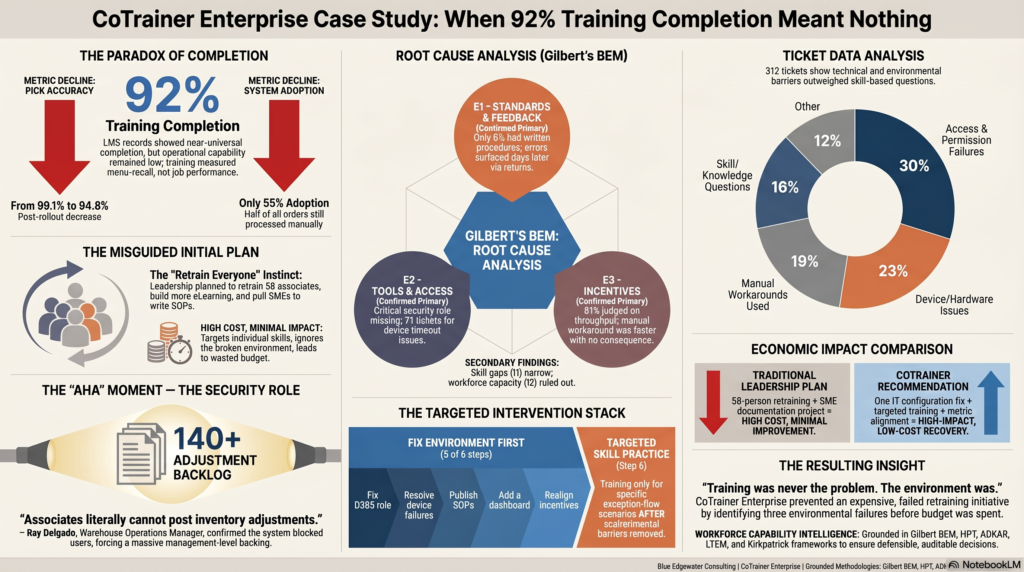
We ran a pilot scenario based on a regional distribution company — let’s call them Northgate — ten weeks after going live on Microsoft Dynamics 365 Warehouse Management. The situation was urgent. Pick accuracy had fallen from 99.1% to 94.8%. Throughput was down 18%. There were 140+ open inventory adjustment items sitting in a backlog. Only about half of orders were being processed in the new system.
The LMS showed 92% of associates had completed the training and passed the knowledge check.
Leadership’s plan: retrain everyone.
Before that plan got funded, we ran the diagnosis. What we found changed the entire response.
Why 92% completion meant nothing
The knowledge check before go-live tested whether associates could identify where buttons were on a screen. Not whether they could handle a short pick when inventory didn’t match. Not what to do when a license plate needed to split across two trucks. Not how to post an inventory adjustment when the numbers were off.
The training was a 90-minute vendor webinar with no hands-on practice, no sandbox time, and no role-specific scenarios. It was a screen tour. Associates watched it, recognized the menu locations, and passed the quiz.
Then they got to the floor, and the system they’d been shown on a slide was a different animal in real use — especially when anything went sideways.
Completion metrics measure attendance and recognition. They don’t measure whether someone can do the work when it gets complicated. These are not the same thing, and conflating them is one of the most expensive mistakes in organizational learning.
The real problems were in the environment, not the people
The diagnostic framework we use is called the Behavior Engineering Model, developed by Tom Gilbert in 1978 and still one of the most rigorous tools available for tracing the actual cause of a performance gap. The model checks six possible causes in a specific order: environmental causes first, individual causes second.
The reason for that order matters. Environmental causes — the conditions people work in — have higher leverage and lower cost to fix than individual causes. And critically, training cannot fix them. If the problem is in the environment, more training makes no difference.
At Northgate, all three environmental causes were confirmed.
The first was a missing standard. Only 8% of associates had a written procedure to follow for their daily tasks. No one had ever documented what “correct” looked like in the new system. Errors only surfaced when a customer rejected a load — days after the transaction, long after anyone could trace what went wrong. There was no feedback loop. Associates were being asked to do the work correctly without ever being told what correctly meant.
The second was a system access problem. The inventory adjustment security role had never been provisioned to the associate user profile. Associates were literally blocked by the system from posting their own adjustments. Every single adjustment — 40 to 50 a day — was routing to the Warehouse Operations Manager, Ray Delgado, who held the role. Ray was spending two to three hours every day doing data entry that his associates should have been handling. That is the entire explanation for the 140-item adjustment backlog. One IT configuration change, never made.
The third was a rational incentive to bypass the system. Associates were measured exclusively on units shipped and on-time truck departures. Nobody tracked whether they processed orders in D365 or on a paper pick sheet. The manual workaround was faster, carried no consequence, and was explicitly tolerated by management when trucks were at risk. 81% of associates surveyed said their job was judged on throughput alone — not on whether they used the new system. They weren’t avoiding D365 out of stubbornness. They were making the correct rational calculation given the incentive structure they were operating under.
Of 312 help-desk tickets logged over ten weeks, only 49 — about 16% — were genuine “I don’t know how to do this” questions. The rest were access failures, device problems, and associates declaring they’d used the manual method instead. The ticket data alone points away from a training root cause.
Ray said it better than the data did
Ray Delgado wrote up his own assessment at week ten. One passage captures the situation precisely:
“Adjustments are a mess and it’s not a skill issue — it’s an access issue. Associates literally cannot post inventory adjustments; the security role was never granted to them. So every single adjustment funnels to me. I’m doing 40–50 a day. That’s the backlog everyone’s worried about, and it would mostly evaporate if someone in IT just gave the floor the right permission. I keep saying this and it keeps not happening.”
And then, on the question of documenting the procedures:
“I get why they’re asking — I’m the one who knows it. But I’m also the one drowning in the adjustment queue, and I am the most expensive person in the building to be doing data entry and writing manuals. If you pull me off the floor to author documentation, the floor stops. What would actually work: get the access fixed so I’m not posting every adjustment, have someone whose job is building job aids sit with me for an hour to capture the exception flows, and I’ll review what they write so it’s accurate. I don’t need to write it. I need to correct it.”
This is someone who has diagnosed his own situation correctly. The organization wasn’t listening — because the instinct to “retrain everyone” is loud and familiar, and the actual root causes were quieter and less obvious.
What a skills gap actually looks like — and what it doesn’t
There was a skills gap at Northgate. It was real. But it was narrow, and it only mattered after the environment was repaired.
Associates handling standard, clean orders had reached about 58% confidence at week ten and were still improving — picking it up through daily exposure. The cliff was on four specific exception scenarios: short picks, license plate splits, cycle-count variances, and inventory adjustments. Confidence on those ranged from 4% to 11%.
Those exception scenarios had been completely absent from the original training. No scenarios, no sandbox practice, no video walkthrough. Associates were never shown how to handle them. That’s a genuine skill gap — but it’s narrow and specific, not a broad workforce failure.
Crucially, it also couldn’t be addressed until the environment was fixed first. Associates can’t practice posting inventory adjustments when the system won’t let them access the function. Skills training on a broken substrate produces strong completion metrics and no behavior change on the floor. Which is exactly what happened the first time.
The right sequence
The correct intervention plan wasn’t “retrain everyone.” It was:
Fix the access problem first. One IT configuration change adds the inventory-adjustment security role to the associate user profile. That single change eliminates the structural cause of the 140-item backlog and frees Ray from two-to-three hours of daily data entry. It takes days, not weeks.
Define what correct looks like and make it visible. A trainer or instructional designer conducts a structured working session with Ray — about 60 minutes per major workflow — and authors step-by-step procedures and laminated quick-reference cards. Ray reviews the drafts for accuracy. He doesn’t write them. That distinction matters: the most expensive person in the building reviews for accuracy; the lower-cost role does the authoring. A compliance dashboard, visible on the warehouse floor, closes the feedback loop — associates seeing their own numbers in near real-time rather than hearing about errors days later via customer returns.
Change the measurement. The Director of Operations makes one formal communication: D365 compliance is now measured alongside throughput. The workaround has an end date. Shift leads are calibrated on how to enforce it. This is a leadership action, not a training event — and it only goes out after the access fix and the procedures are confirmed in place. Announcing a new standard before the system works sets people up to fail and burns the credibility of the announcement.
Then, and only then, targeted exception-handling practice. Two to three hours per cohort, small groups, working through realistic scenarios in a D365 sandbox. Task completion as the assessment, not a quiz. Only for the associates who handle exceptions, not the full population. Exception leads complete first so they can reinforce on the floor.
This is not the expensive response. It is the correct one.
The question underneath all of this: why does the wrong instinct win?
When performance drops after a training program, the natural conclusion is that the training needed to be better, longer, or more thorough. More training. That instinct is reinforced by the fact that training is visible, deliverable, and familiar. You can point to it. You can check it off. Completion metrics make it measurable.
The actual root cause analysis — checking whether the environment supports the behavior you’re asking for, whether the incentive structure rewards it, whether the tools actually work — is harder to package and harder to sell. It takes expertise to do it rigorously. It takes time. And sometimes it produces an answer that makes someone else responsible for the fix: IT, operations leadership, the payroll system that’s been tracking the wrong things for a decade.
Organizations don’t skip the diagnosis because they’re careless. They skip it because it’s slow, requires specialized knowledge, and occasionally delivers uncomfortable news.
What we built to make it fast
CoTrainerEnterprise is a diagnostic pipeline we built to compress the time between “something is wrong” and “we know what’s actually wrong and who should fix it.”
It takes your evidence — survey results, LMS completion records, help-desk ticket exports, manager interview notes, SME feedback — and runs it through a structured four-stage pipeline: a normalized intake, a full six-cell BEM diagnosis, a prioritized intervention plan, and four audience-specific deliverables: a plain-language leadership brief, a manager action plan, a capability risk assessment, and a full intervention recommendations document with a Kirkpatrick evaluation plan.
The whole thing runs in under ten minutes.
What makes it different from running a prompt through a language model isn’t the output quality — it’s the validation layer. A set of deterministic rules runs after every agent stage. Rule 1 blocks the pipeline if training gets recommended as the primary fix when the diagnosis says the problem is environmental. Rule 7 flags when a high-cost person is being assigned to work that a lower-cost role could do — the “have Ray write the SOPs” problem, made automatic and auditable. Every run produces a tamper-evident log that records exactly which methodology files drove which outputs, which rules passed and which flags fired.
This matters for enterprise contexts because the answer to “why did the pipeline recommend this?” needs to be traceable and correctable. If the intervention economics don’t reflect your organization’s pay structure, you open the relevant methodology file, edit the rule, and re-run. No code, no developer. The change is versioned and audited.
The pipeline runs on cloud, on an Azure enterprise endpoint that keeps data inside your boundary, or fully offline against a local model if the data can’t leave the machine.
This works before the crisis too
Everything above is reactive — diagnosing a problem that’s already in motion. But CoTrainerEnterprise is designed for the proactive moment too.
The highest-leverage use of this kind of diagnosis is before a training program is commissioned, not after. Before the ERP goes live. Before the compliance initiative launches. Before the onboarding program gets rebuilt. A diagnostic run at that stage asks: does this environment actually support the behavior we’re about to train for? Are the tools working? Is the incentive structure aligned? Do managers have a clear standard to hold?
If the answer to any of those is no, the right move is to fix the environment first — and delay or descope the training until the substrate will hold it.
The cost of that diagnosis is a fraction of the cost of a training program that can’t transfer. The cost of the training program is a fraction of the cost of the performance gap persisting while the organization figures out why the training didn’t work.
The one thing worth remembering
92% of associates at Northgate completed the training. 92% passed the knowledge check.
The system access was broken. The standard had never been written. The incentive rewarded the workaround.
Training completion measures whether people showed up and whether they can recall what was on the screen. It does not measure whether the organization has given them a working environment in which to apply what they learned.
Getting that right requires a diagnosis. The diagnosis needs to come first.
CoTrainerEnterprise is part of the Workforce Capability Intelligence platform from Blue Edgewater Consulting — alongside CoTransfer (knowledge capture before expertise walks out the door), CoBuild (turning captured expertise into learning assets), and CoSignal (monitoring capability risk over time).
The pilot scenario described here — Northgate Distribution Co., ten weeks post D365 go-live — is fictional and purpose-built as a demonstration. The diagnostic logic is grounded in Gilbert’s Behavior Engineering Model, Mager & Pipe’s performance analysis framework, Prosci’s ADKAR model, and Kirkpatrick’s four levels of evaluation.
The CoTrainer app is the practitioner’s starting point — five questions, instant consultant-grade outputs. CoTrainerEnterprise is the enterprise version: validated, auditable, and deployable inside your data boundary.
Leave a Reply
You must be logged in to post a comment.