I’ve been an instructional designer long enough to know the difference between training that looks good in a deck and training that actually changes behavior on the job. That gap — between what gets designed and what actually transfers — has bothered me for most of my career.
This weekend I did something about it. Not by writing another framework document or attending another webinar about the future of learning. I built.
Three working AI tools, deployed on my website, available for anyone to use. No mockups. No Figma files. Actual, functional instruments that run on a live language model and produce outputs a real L&D professional could hand to a stakeholder today.
Here’s what I built and why each one matters to me.
Tool 1: The Learning Needs Analysis
Every L&D project I’ve ever worked on has had the same vulnerability at the front end — the needs analysis. Either it doesn’t happen at all, or it happens as a thirty-minute conversation that gets summarized in a bullet point and called done. Then we build training for a problem we never actually diagnosed, and wonder six months later why nothing changed.
The Learning Needs Analysis tool at blueedgewater.com/ai-tools-gallery is my answer to that. You describe a performance problem in plain language — the way you’d explain it to a colleague over coffee. The system runs a structured diagnostic grounded in Gilbert’s Behavior Engineering Model, determines whether training is actually the right intervention, generates Bloom’s-mapped learning objectives, prioritizes recommendations, and produces a Kirkpatrick Level 1 through 4 evaluation plan.
The whole thing takes about fifteen seconds.
I’ve sat in rooms where that analysis took three weeks and a consulting invoice. I’m not saying the tool replaces the nuance of a skilled consultant — but I am saying it eliminates the blank page problem, surfaces questions that often get skipped, and gives any L&D professional a defensible starting point for a stakeholder conversation.
Tool 2: The Training Content Generator
Once you know what needs to be built, someone has to build it. That’s where most of the hours go — and most of the budget.
The Training Content Generator lets you paste in raw source material — a policy document, a process description, notes from a SME interview, anything — define your audience and their experience level, and select the artifacts you need. Learning objectives, job aid, quiz questions, storyboard outline, facilitator guide, performance assessment checklist. Each one generated from the actual content you provide, not generic templates.
What I care about here isn’t the speed — though it is fast. What I care about is that every artifact is grounded in the source material and mapped to an ID framework. The objectives use Bloom’s action verbs. The assessment measures observable behavior. The storyboard follows a logical instructional sequence. The AI doesn’t just generate content. It applies a design logic I’ve spent years developing.
That’s the thing about building these tools. You can’t be vague. You have to know exactly what a good learning objective does before you can write the prompt that produces one. Building made me a sharper designer.
Tool 3: The Performance Coaching Simulator
This one is the one I’m most proud of — and the one that most directly addresses the problem I’ve cared about longest.
Most training fails at Level 3. Learners complete the course, pass the quiz, and then walk back onto the job and do exactly what they were doing before. Not because they didn’t learn anything. Because they never practiced applying it under realistic conditions.
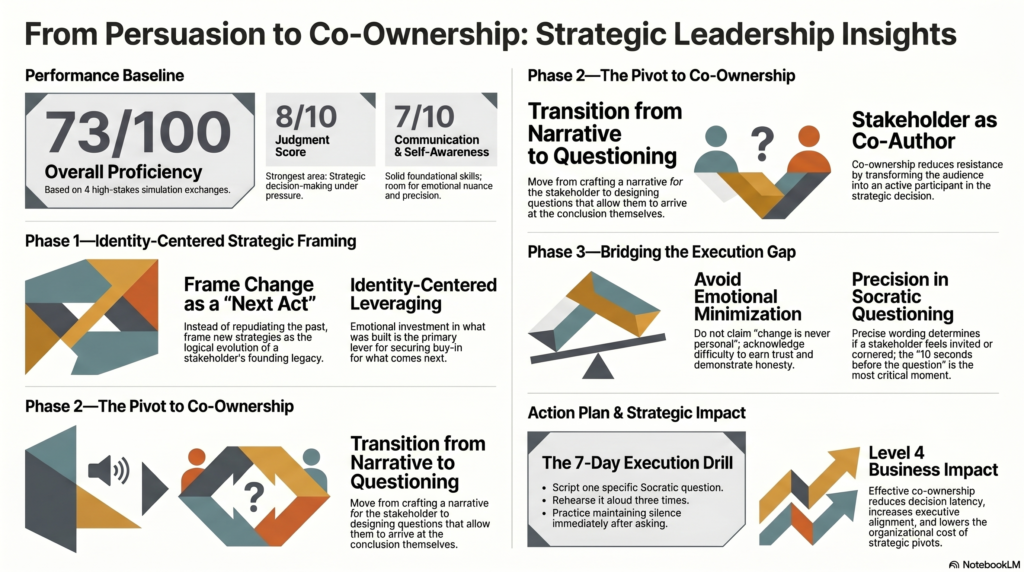
The Performance Coaching Simulator puts you inside a high-stakes workplace scenario — a top performer threatening to quit, a misaligned executive stakeholder, a price objection from a client you can’t afford to lose. You work through it in real time with an AI coach that asks Socratic questions rather than giving you the answer. After four exchanges the session closes with a scored debrief: dimension scores across self-awareness, communication, and judgment, two strengths, two development priorities, a specific seven-day next action, and a note connecting the simulation directly to Kirkpatrick Level 3 behavior transfer and Level 4 business results.
That last piece matters to me. It’s easy to build something that feels like coaching. It’s harder to build something that explicitly connects the practice experience to an outcome a business leader cares about. I wanted anyone who used this tool to be able to articulate exactly why the simulation they just ran is worth their time in terms the CFO would recognize.
What I Actually Learned
I’m not a developer. I want to be clear about that. I built these tools using AI-assisted development — Claude Code handled the engineering while I handled the instructional architecture, the product decisions, and the design logic behind every prompt.
But that’s kind of the point.
The tools work because the instructional design behind them is sound. The AI can generate a needs analysis report because I knew what a good needs analysis contains. It can produce a Kirkpatrick evaluation plan because I understand what each level is actually measuring. The technology is the accelerant. The expertise is what makes the output worth using.
That’s what I want other L&D professionals to take from this — not that you need to become a developer, but that the frameworks you already know are exactly what’s needed to build AI tools that produce real value. The gap between instructional design and AI development is smaller than it looks. You just have to start building.
All three tools are live and free to use at blueedgewater.com/ai-tools-gallery.
If you try them and want to talk about what AI-powered learning design could look like in your organization, reach out at jason@blueedgewater.com. I’d genuinely like to hear what you’re working on.
UPDATE: After taking the Performance Coaching Simulator assessment I was able to clue into what needed to change in my presentation to the “board” and turned out to be an exercise in Change Management that is quite sticky and memorable. This is the hands-on Constructivist approach I was aiming for. After the assessment I copied the results into NotebookLM and made an infographic to help digest the results. A good learning experience if you want to try for yourself!
https://blueedgewater.com/performance-coaching-simulator/
Leave a Reply
You must be logged in to post a comment.