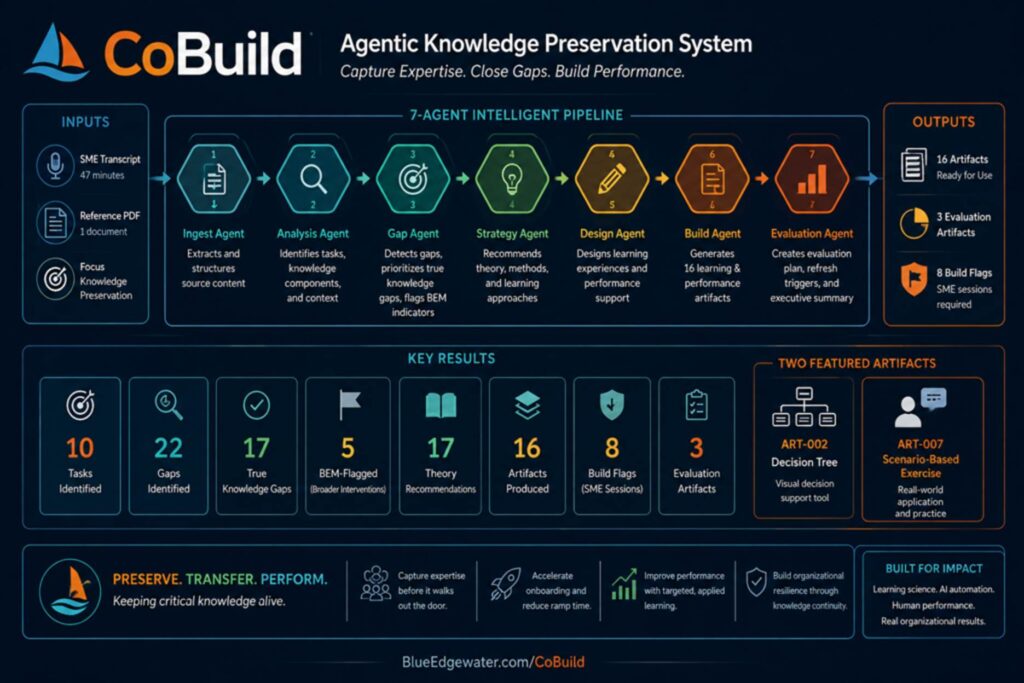
CoBuild is an agentic knowledge preservation system designed to capture expertise before it disappears and transform tribal knowledge into scalable performance support. Built at the intersection of learning science, instructional design, and AI workflow automation, CoBuild analyzes expert knowledge, identifies critical tasks and performance gaps, recommends evidence-based learning strategies, and generates implementation-ready learning artifacts designed to strengthen workforce capability and organizational continuity.
In this demonstration, a single 47-minute expert transcript and supporting reference material moved through a seven-agent pipeline that identified 10 critical tasks, surfaced 22 potential learning gaps (including 17 validated knowledge gaps and 5 Human Performance Technology indicators requiring broader intervention), applied recommendations across four instructional frameworks, and generated 16 implementation artifacts — including scenario-based learning activities, decision-support tools, evaluation plans, and knowledge retention assets. The system also identified deployment risks requiring additional subject matter expert validation before implementation.
The result is not simply content generation. It is an approach to preserving institutional expertise, accelerating onboarding, improving performance support, and helping organizations build learning ecosystems that remain resilient as knowledge evolves and experienced employees transition out of the workforce.
| DECISION TREE • ART-002 Pre-Close Inventory Check When to abbreviate and when to run full review • Completes in under 5 minutes on a normal month |
| START HERE — DECISION NODE 1 Open the D365 inventory indicator. What does it show? SME SESSION REQUIRED (q-001): Exact D365 field/screen name and the label text for each state as it appears in the system. |
| BRANCH A “Nothing changed” state confirmed in indicator | BRANCH B Changed or ambiguous state shown in indicator | BRANCH C Indicator is missing or inaccessible |
| ↓ | ↓ | ↓ (treat as Branch B) |
| [PROCEED] PATH 4a — ABBREVIATED CHECK Confirm the abbreviated check action per q-001. Mark checklist item complete. Estimated time: under 5 minutes. | [PROCEED only after completion] PATH 4b — FULL CHECK REQUIRED Run full inventory review per q-001 steps. └─ follow ART-013 and ART-014. Mark complete only when variance is resolved or formally documented. | [PROCEED only after completion] PATH 4b — FULL CHECK REQUIRED Note in checklist: “Indicator unavailable — full check performed.” Notify stakeholder contact (BEM flag 2). Then follow Path 4b steps. |
| WORKED EXAMPLES Example 1 — Normal month: Abbreviation safe Indicator state, action taken, and result to be confirmed with Maria in q-001 session. Example 2 — Month where full check was required Indicator state, action taken, finding, and outcome to be confirmed with Maria in q-001 session. |
| REVIEWER NOTE All INSERT fields and worked example content require the q-001 SME session. Tree structure, path names, and outcome labels are finalized. |
| SCENARIO • ART-007 • Two-Page Unresolvable Reconciling Item What to do when close won’t close clean |
PAGE 1 — COPING MODEL & SCENARIO CONTEXT
| Here is what an experienced close manager does when they hit day six with an unresolved reconciliation item. This situation is not a failure — it happens several times a year, and there is a right way to handle it. Maria has done this. You will do it too. The goal is to make the right call with confidence and communicate it clearly to the controller. Being in this situation is not the problem. Making an unauthorized decision, or failing to communicate it clearly, is the problem. |
Scenario Context
| SME SESSION REQUIRED (q-007) Maria must describe the last time she closed a period with an unresolved reconciling item. Required: which sub-ledger, approximate difference amount, day of close it surfaced, investigation steps taken, resolution options, and what she ultimately decided. Written as a second-person narrative: “It’s day [X] of close. The [sub-ledger] reconciliation has a [$] difference…” [Scenario narrative to be written here from q-007 session output.] |
Before You Decide Anything — Confirm These Three Things
Work through this checklist before taking any action.
☐ 1. I have documented what I investigated and what I found.
If you have not written it down, write it down now — before continuing.
☐ 2. I know the dollar amount and which sub-ledger is affected.
Both must be specific. “Approximate” is not enough.
☐ 3. I know whether this difference is timing-based or unexplained.
Timing-based → return to ART-006 now. Unexplained or uncertain → continue to Page 2.
PAGE 2 — DECISION BRANCH & COMMUNICATION TEMPLATE
You have confirmed the difference is real, documented your investigation, and determined it cannot be resolved before the close deadline. Now choose the correct path.
| PATH A — Hold the Period Open / Extend On Hold When to use: [q-007: conditions Maria uses to decide to hold the period] Who authorizes: [q-007: does Maria decide independently or does the controller authorize?] What to document: [q-007: what Maria records when choosing Path A] |
| PATH B — Close with a Known Reconciling Item When to use: [q-007: conditions under which Maria closes with a known item] Documentation required: [q-007: where, what content, what format — exact requirements] Who must approve: [q-007: controller sign-off required, or Maria’s independent judgment?] |
| PATH C — Escalate to Controller for Decision When to use: [q-007: when Maria escalates rather than decides independently] What to bring: Use the Controller Communication Template below. |
Controller Communication Template
Use this template when executing Path C, or any time you are uncertain.
| CONTROLLER COMMUNICATION — Unresolved Reconciling Item |
| “I have an unresolved item in the [sub-ledger name] reconciliation.” “The difference is [$amount]. I have investigated [list each step taken].” “I believe the cause is [your best explanation, or ‘unknown at this time’].” “My recommendation is [Path A: hold open • Path B: close with known item • I need your guidance].” “If we proceed with Path B, the documentation I will prepare is [memo, D365 notes, email].” “I need a decision by [time] to meet the [reporting deadline].” |
| EXPERT RATIONALE You do not need to have all the answers before making this call. What matters is that you have investigated, you can describe what you found, and you have a recommendation. The controller wants a clear picture, not a solved problem. |
Documentation Protocol — After the Decision Is Made
| SME SESSION REQUIRED (q-007) What does Maria document after closing with a known reconciling item? Where? What would an auditor expect to find? Include: D365 notes field, external workpaper, email trail, required content for each. [Populated from q-007 session output.] |
After the Period Closes — Follow-Up Action
This item becomes a priority investigation for the first week of the new period. Document the follow-up action and owner in [q-007: wherever Maria tracks open carry-forward items].
| SME SESSION REQUIRED (q-007) Where does Maria record open items that carry forward to the next period? |
| REVIEWER NOTE Coping model, checklist structure, communication template, and expert rationale are finalized. Page 1 scenario narrative, all three Path conditions, documentation protocol, and follow-up tracking location require q-007. |