
Design Instructional Interventions
Challenge 1: Identify instructional strategies that align with instructional goals and anticipated learning outcomes
Criteria for successful completion of this challenge: Evidence of utilizing the best instructional strategies (scaffolding, modeling, cooperative learning, case studies, service learning, etc.) based on the instructional goals and learning outcomes of a project. Reflection must address: How you determined the instructional strategies based on the instructional goals for the project. Example: Learning Design Activities (EDCI 575), Lesson/Training Plans (EDCI 568), Design Documents (EDCI 572), eLearning Proposal (EDCI 569 if taken prior to Spring 2021), Individual Game Document (EDCI 556), Deliverables from Practicum (EDCI 573), case studies demonstrating learning theories for different situations (EDCI 513, EDCI 672), Design Document (EDCI 569 if taken in Spring 2021 or later), other artifacts (work related or other) matching best instructional practices/strategies to learning goals and outcomes.
Reflection
Reflection on Aligning Instructional Strategies with Instructional Goals in the ‘Designing with the Theories’ Project
For the competency “Identify instructional strategies that align with instructional goals and anticipated learning outcomes,” I have selected my project “Designing with the Theories” as my artifact. In this project, I developed a series of learning modules for an AI-driven tool called Sapient Clinician, aiming to educate doctoral students and teachers on how to use the tool effectively. The project involved applying various learning theories to design instructional strategies that align with specific instructional goals and learning outcomes.
In developing these modules, I identified clear instructional goals:
- Mastery of Specific Tasks: Enable learners to master both basic operations and advanced features of Sapient Clinician, such as inputting patient data, selecting diagnoses, and generating treatment plans.
- Development of Problem-Solving Skills: Foster critical thinking, creativity, and reasoning when using AI tools, allowing learners to analyze complex patient cases and apply knowledge effectively.
- Enhancement of Self-Efficacy and Motivation: Build learners’ confidence in using the AI tool through observation, modeling, and self-regulation strategies.
- Improvement of Information Processing and Retention: Strengthen learners’ ability to process, store, and retrieve information related to Sapient Clinician’s functionalities.
- Construction of Knowledge through Experience: Encourage learners to actively construct their understanding of the AI tool through real-world applications, collaboration, and reflection.
To achieve these goals, I determined the instructional strategies by aligning them with appropriate learning theories, each offering specific strategies that address different aspects of the instructional objectives.
- Behaviorism: For mastering specific tasks, I employed drill-and-practice techniques, immediate feedback, and mastery learning approaches. The modules were designed to require learners to achieve 100% accuracy before progressing, ensuring errorless performance. For example, learners practiced entering patient details and received immediate corrective feedback, reinforcing desired behaviors.
- Cognitivism: To develop problem-solving skills, I incorporated scaffolding, worked examples, problem-solving tasks, and metacognitive reflection. Learners observed step-by-step demonstrations and gradually took on more complex tasks with reduced guidance. They engaged in open-ended problem-solving activities and reflected on their learning processes, enhancing their ability to transfer knowledge to real-world contexts.
- Social Cognitive Theory: To enhance self-efficacy and motivation, I integrated modeling, observational learning, and self-regulation strategies. Learners watched expert demonstrations via interactive videos and then practiced tasks themselves. They set personal goals, tracked their progress, and received feedback, which reinforced their confidence and motivation. Peer interactions and collaborative activities further supported learning through social means.
- Cognitive Information Processing Theory: To improve information processing and retention, I used strategies like advance organizers, encoding-retrieval similarity, and schema theory. Modules were structured to connect new information with prior knowledge, using signals and interactive elements to focus attention. Practice questions and concept maps helped strengthen encoding and retrieval processes, facilitating long-term retention.
- Constructivism: For constructing knowledge through experience, I employed inquiry-based learning, peer collaboration, authentic assessments, and reflective teaching. Learners engaged in discovery learning, worked on real-life patient scenarios, and collaborated with peers to diagnose cases using Sapient Clinician. They built portfolios and reflected on their progress, actively constructing their understanding through meaningful experiences.
- Gagné’s Nine Events of Instruction: To provide a comprehensive and structured learning experience, I followed Gagné’s nine events, ensuring that each instructional element—from gaining attention to enhancing retention and transfer—was thoughtfully addressed. For instance, I began modules with engaging content to capture attention, clearly stated objectives, stimulated recall of prior learning, presented new content methodically, provided practice opportunities, and offered feedback and assessments to reinforce learning.
The determination of these instructional strategies was directly based on the instructional goals and anticipated learning outcomes:
- Alignment with Mastery Goals: Recognizing the need for learners to master specific tasks, I selected behaviorist strategies that focus on observable changes in behavior. Drill-and-practice techniques and immediate feedback ensured that learners could perform tasks accurately, aligning with the goal of achieving errorless performance.
- Fostering Higher-Order Thinking: To develop problem-solving skills and critical thinking, I turned to cognitivist strategies that emphasize internal mental processes. Scaffolding and worked examples helped learners process information effectively, while metacognitive activities encouraged them to think about their thinking, aligning with the goal of transferring knowledge to real-world contexts.
- Building Confidence and Motivation: Understanding that learners’ beliefs about their abilities affect their performance, I incorporated social cognitive strategies. Modeling and observational learning allowed learners to gain confidence by observing experts, and self-regulation strategies like goal setting and progress tracking aligned with the goal of enhancing self-efficacy.
- Enhancing Memory and Retention: Acknowledging the complexity of using an AI tool, I employed cognitive information processing strategies to help learners process and retain information. Techniques like advance organizers and encoding-retrieval similarity ensured that learners could store information in long-term memory, aligning with the goal of improving information processing.
- Constructing Knowledge Through Experience: To enable learners to build their own understanding, I integrated constructivist strategies. Inquiry-based learning and authentic assessments provided opportunities for learners to engage with real-world problems, aligning with the goal of constructing knowledge through experience.
- Ensuring Comprehensive Instruction: By applying Gagné’s nine events, I ensured that all instructional elements were addressed systematically. This approach provided a clear roadmap for the instructional process, aligning with the goal of delivering a structured and effective learning experience.
Specific Examples:
- In the Behaviorism module, learners practiced inputting patient data with immediate feedback. If they made an error, the system provided corrective guidance, and they repeated the task until mastery was achieved.
- In the Cognitivism module, learners engaged in worked examples, observing an instructor setting up a virtual patient and then replicating the process themselves. They progressed from simple to complex cases, scaffolding their learning.
- Using Social Cognitive Theory, learners watched interactive videos of experts using Sapient Clinician, then practiced themselves, setting personal goals and receiving feedback to build self-efficacy.
- Applying Cognitive Information Processing Theory, I used advance organizers to connect new content with prior knowledge and included non-graded quizzes for retrieval practice, strengthening memory.
- In the Constructivism module, learners worked in groups to diagnose patient cases, engaged in class discussions, and built portfolios reflecting their learning journey, constructing knowledge collaboratively.
- Following Gagné’s Nine Events, I designed each module to gain attention (e.g., using engaging visuals), inform learners of objectives, stimulate recall, present content, provide guidance, elicit performance, offer feedback, assess performance, and enhance retention and transfer.
Reflecting on this project, aligning instructional strategies with instructional goals and anticipated learning outcomes was crucial to the effectiveness of the learning modules. By thoughtfully selecting strategies that directly supported the instructional goals, I was able to create a cohesive and engaging learning experience that addressed both the technical skills and the higher-order thinking abilities required for using Sapient Clinician.
This process reinforced the importance of understanding how different instructional theories and strategies can be applied to achieve specific learning objectives. It highlighted that a multifaceted approach, drawing from various theories, can address the diverse needs of learners and the complexities of the content.
Moving forward, I plan to continue this practice of aligning instructional strategies with instructional goals in future projects. This experience has deepened my appreciation for the deliberate selection of instructional methods and the impact it has on learner success. By leveraging insights from different learning theories, I aim to design effective and engaging learning experiences that empower learners to achieve their goals confidently and competently.
Challenge 2: Apply appropriate interaction design and interactive learning principles.
Criteria for successful completion of this challenge: Evidence of implementing interactional pieces of design (user experience, design and balance, efficiency, understanding the interface) in the development of instructional materials.
Artifact
After I took feedback from my professor, I edited the module below.
Feedback:
Jason,
You did a great job on your module! The use of a consistent color scheme and formatting gave it a polished and cohesive look, and the navigation was intuitive and easy to follow. These foundational elements really help learners stay focused on the content.
I also appreciate your use of audio narration. However, I think the module would be even more engaging if you used your own voice instead of the current auto-generated one. As I mentioned before, if you’re using AI, the Synesthesia voice option might be a better alternative—it’s more natural and easier to follow.
A few areas could use refinement:
- Transitions between content sections could be improved. In some places, it wasn’t entirely clear how the material connected to the learning objectives. A brief explanation or cue might help reinforce those links.
- Color contrast needs attention in several places. For example, white text on a light blue background is hard to read, especially on the Growth vs. Fixed Mindset slide. Enhancing contrast will improve readability and accessibility.
- On the “Where do you want to explore…” slide, consider adding a clear active state to the buttons. The current light blue color is same with the previously visited state, making it difficult to tell which option is selected. Again, white text on a light blue background continues to pose contrast issues here.
- The slider interaction works well functionally—great job there! One suggestion to enhance its visual appeal would be to vary the colors of the text boxes or use different background images for each layer to better distinguish the content.
- On the “What does freedom really cost?” slide, I wasn’t sure how fast or how far I was supposed to move the slider. It might help to limit the motion to reveal one item at a time, and consider adjusting the design of the items so they don’t look like clickable buttons (since they aren’t). This will help avoid confusion.
- On the “22 Foot Monohaul…” slide, the text above and below the heading is too small and hard to read. Increasing the font size would make the information more accessible.
- Have you considered adding a menu or progress bar? This would help learners track where they are in the module and what’s coming next.
- Finally, the “Time to Grow Your Skills” slide was a bit confusing. I’m not sure the audio instructions clearly explained how to complete the 360 activity. I wasn’t able to interact with all the items and couldn’t return to the third one after navigating away. It might help to simplify the instructions and check the functionality to ensure learners can complete the interaction as intended.
- The previous menu did not work properly in some slides for me.
- On the question below, the audio said I got it right but the feedback screen showed I got it wrong:
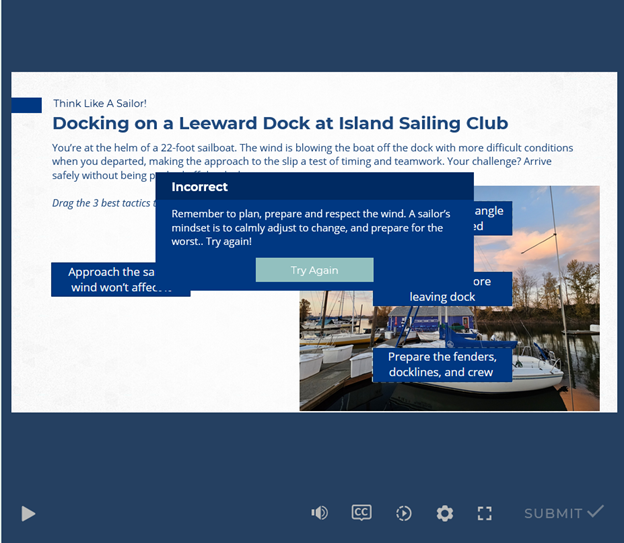
Overall, this is a strong module with a lot of thoughtful design choices. With a few adjustments, it could become even more effective and engaging.
Revised Artifact
After including the feedback I am happy with the final iteration.
Reflection
Applying Message and Visual Design Principles in My Sailing Module
A central goal for my eLearning module was to ensure that both the message and visuals supported a seamless, accessible, and engaging learning experience. Throughout the design process, I deliberately applied key visual design principles—including proximity, repetition, alignment, and contrast—as well as clear message design, focusing on both the content and its delivery.
Proximity and Alignment:
From the outset, I used proximity and alignment to group related information together, keeping instructions close to interactive elements and aligning text, buttons, and icons consistently. This was especially effective on the checklist and slider screens, where learners needed to quickly scan and understand their options. These choices made navigation more intuitive, reducing cognitive load and supporting the flow of each scenario.
Repetition and Consistency:
By repeating a cohesive color palette, button styles, and typography across slides, I established a polished, unified look and feel. As noted in my feedback, this repetition provided a strong visual anchor, allowing learners to focus more on content and less on deciphering new layouts from slide to slide.
Contrast and Readability:
After reviewing feedback, I recognized that my original use of white text on light blue backgrounds—though visually appealing—did not provide sufficient contrast for accessibility. I revised these slides, boosting contrast by using darker text on lighter backgrounds and increasing font size where needed (e.g., on the “Growth vs. Fixed Mindset” and “22 Foot Monohaul” slides). These changes improved readability and made the content more ADA-compliant.
Message Design and Transitions:
To strengthen message clarity, I added transitional cues and explanatory prompts at key points in the module, making sure each segment clearly connected to the learning objectives. This not only helped reinforce why a particular activity or concept mattered, but also guided learners smoothly from one section to the next, minimizing confusion.
User Guidance and Feedback:
I refined the instructions and feedback loops based on comments about confusion and audio mismatches. For instance, I simplified instructions on the 360 activity and ensured that all audio and text feedback matched, supporting clear, immediate understanding.
Interactive Cues and State Changes:
Another key improvement was implementing clear visual cues for interactive elements. For example, on the “Where do you want to explore…” slide, I enhanced the active and visited states for buttons, so learners could easily see which destinations they’d selected. I also varied the slider colors and backgrounds to help users distinguish between layers and steps.
Navigation and Progress:
Responding to suggestions, I added a progress bar and improved the menu, helping learners track their journey through the module and revisit sections as needed. This not only enhanced usability but also empowered learners to control their pacing.
Accessibility:
I prioritized accessible font choices, increased font sizes where needed, and ensured adequate color contrast across all slides. I also checked tab order and alt text to make the module friendlier for learners using assistive technologies.
Conclusion:
Applying these visual and message design principles was essential to creating an engaging, accessible, and effective module. Iterating after instructor feedback made the final product not only more visually appealing, but also more user-friendly, consistent, and impactful. This process underscored the value of user testing, accessibility, and continual refinement in instructional design—a lesson I’ll carry forward in every future project.